
 Open Account
In today’s evolving digital world, putting pen to paper seems like a chore. After all, everything we need — from paying bills to ordering dinner — can be done with a click of a button using our smart phones. But there may come a time where you’ll need to know how to write a check. Don’t fret – writing a check is easy and an important skill to learn.
Before you write and sign a check, confirm your Personal Information is correct on the top left corner of the check. If it’s not your name or information on the check, you legally cannot sign the check.
Writing a check is simple with these 6 steps:
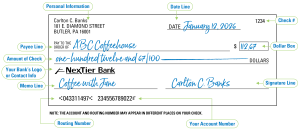
Step One: Write today’s date on the Date Line. It’s best practice not to write out checks in advance, which is often referred to as post-dating checks.
Step Two: On the Payee Line, write the name of the person or business. This is also known as the payee. Ex: ABC Coffeehouse.
Step Three: In the Dollar Box, write the dollar amount as close to the left edge of the box to protect your check from being altered.
Step Four: On the Amount of Check line, write out the dollar amount and add a line at the end of the written dollar amount to protect your check from being altered. To write a check with cents, be sure to put the cents over 100. Ex: $112.67 should be written out as one-hundred twelve and 67/100.
Step Five: The Memo Line is optional, but you can choose to write a note to help remember what the check is for. Ex: Coffee with Jane.
Step Six: Sign the check on the Signature Line. Checks cannot be cashed without a signature.
It’s that simple! Now you’re ready to hand the check to the person or business.
Don’t forget to record your transaction to keep your account balanced and up to date. You can keep an Excel spreadsheet if that suits you or write transactions in a checkbook register. Free checkbook registers are available at any of the NexTier Bank locations.
If you have any questions, contact our Customer Care Center at 1.800.262.1088 or visit a branch near you.
Don’t have an account with NexTier yet? Select deposit accounts can be opened online. Click here.